the art of computer deception
jim bumgardner
introduction
Since 1994 I have created and performed a number of effects which involve
using a computer. These effects borrow heavily from classic 2-person
mentalist/medium acts (typically husband and wife) of the 19th and
early 20th centuries. These acts are described in books such as Albert A.
Hopkins' "Magic, Stage Illusions, Special Effects
& Trick Photograph" (Dover) and Theodore Annemann's "Practical Mental Magic."
The two person acts discussed in these books are a real
gold mine for computer programmers wishing to endow their machines with special powers.
Like those acts, one can produce the illusion that the medium has vastly
superior deductive powers than ordinary mortals. And like those acts,
various techniques are used to covertly transmit information to the medium. But since
the medium is a computer, only one live performer is required.
A few of these effects are collected on my web page, here:
Jim's Computer-aided Magic
This document is an a catalog of many of the various techniques I have either used in
performance, tested, or thought about. It is intended to be of interest to other
programmers who are working on similar effects, and to magic historians and collectors of effects.
Each technique is described along with an explanation of the origins of the technique,
to the best of my (limited) knowledge. I should start by acknowledging that many of the techniques I
have independently discovered were probably invented by others before me, or are adaptations of partner acts
that go back to at least the 19th century. Predecessors include Alex Elmsley, a talented magician and programmer of the "punch card" generation before me. Christopher Morgan, a former executive at Lotus also originated
some similar effects in the late 70s. Michael Powers and Steve Beam also published computer-assisted effects in the early 80s. A
list of such effects can be found here, at the conjuring archive
table of contents
1. keyboard based techniques
    1.1 steganography
        1.1.1 card codes
        1.1.2 object codes
        1.1.3 improved additive codes
        1.1.4 timed input

    1.2 keyboard slights
        1.2.1 supressed echo
        1.2.2 deceptive echo: complete phrases
        1.2.3 deceptive echo: codes

    1.3 predictable output

2. mouse/joystick based

    2.1 methods of indicating quantity.
        2.1.1 spatial subdivision
        2.1.2 gestures (movement)

    2.2 methods of delimiting input
        2.2.1 basic click
        2.2.2 two clicks
        2.2.3 move-click
        2.2.4 click-release (or click-move)
        2.2.5 move,click,release
        2.2.6 timed input

3. other methods (network confederate, camera)
1. keyboard based techniques
I list keyboard techniques first because some of these are direct descendants
of the verbal codes used by Mentalist acts since Robert Houdin.
Since the keyboard contains a large number of symbols, it is capable of transmitting
a great deal of information to the computer in a very short period of time.
1.1 steganography
I use the word "Steganography" (borrowed from cryptography) to indicate the group
of input methods in which everything that is input to the computer is in plain
view of the spectator, with no hidden or altered input.
1.1.1 card codes
In my 1994 Macintosh program "Orville," I borrowed a verbal card code by Orville Meyer,
documented by Theodore Annemann in "Practical Mental Magic" (page 292 "a practical card code").
This code transmits a card using a conversation with up to 3 verbal exchanges. In many cases
the magician responds with silence, which makes the code even more effective for those cards
(which can be forced).
I added this code to an "Eliza" program that can have a conversation with the spectators.
Eliza is a classic computer program by Joseph Weizenbaum which is the basis for many of the
talking 'bots' that lurk in online chatrooms today. It was originally intended to mimic
a therapist.
Here is a sample conversation with "Orville":
Computer: Hello, tell me about your problems.
Magician: I have no problems.
Computer: Are you saying "no" just to be negative?
Magician: I am fine, thank you.
Computer: That's nice.
Magician: Now, tell me the name of the card
Computer: I am seeing the color black
Magician: yes
Computer: Yes, the card is definitely a spade
Magician: (silence)
Computer: The card is the nine of spades
1.1.2 object codes
I added some other verbal codes to "Orville" as well, including an object-code loosely based on
Heller's "Second Sight" as described in Hopkin's Dover book. This code, similar to the
Orville Meyer code, is used to identify various common objects found in pockets (coins, jewelry,
and so on). I modified it to include objects commonly found in a modern office environment -
pens & highliters, staplers, post-its, etc.
The code is an state-based additive binary code that uses a database of 64 different objects.
Here is a sample exchange:
Magician: I have this object. Can you tell us what it is?
Computer: It looks like a coin of some kind?
Magician: Exactly right! What kind specifically?
Computer: It looks like a quarter, but it may be counterfeit...
Magician: Right! How recently was it minted?
Computer: A few years ago
Magician: Right, but what year?
Computer: I believe the year was 1991, is that it?
1.1.3 improved additive codes
These old codes were based on verbal exchanges, and are limited to the kinds of
information which can be conveyed verbally. Keyboards provide additional information
which isn't conveyed verbally.
The most efficient coding methods, in my view, use binary numbers, and many of the
codes below, are based on such a system. For example, if you have a list of 64 items
for the computer to recognize, you need only input 6 bits of information, each
bit corresponding to some salient "on or off" feature in the text.
For example, questions can be varied as to the use of punctuation, spaces, capitalization,
backspace, spelling and grammer, among other things.
By treating each of these features as a 'bit' and adding the bits together, one can create
an additive code which can be used to input numbers to the computer. The numbers can be
used to index into a list of items. For example:
 question mark?   add 1
 comma?           add 2
 uppercase used?  add 4
 backspace used?  add 8
 etc.
I find that a 6-bit code (which provides 64 items) is sufficient enough to determine an
item randomly selected from a spectator's pocket. While it's difficult to construct sentences
that contain up to 6 of these kinds of features (without accidentally triggering other features),
it isn't too hard to spread the information out between 2 or 3 sentences, as in the object
code used above.
Also see "Timed Input" and "Supressed Echo" below, for other ways of providing information
for additive binary codes.
1.1.4 timed input
Another way to add information to additive codes is by timing various aspects of
the data entry - for example: the speed of typing certain words, the timing between
the last letter and pressing Enter, and so on. To extend the code used above:
 question mark?   add 1
 comma?           add 2
 uppercase used?  add 4
 backspaced used?   add 8
 first word slow   add 16
 slow ENTER        add 32
In practice, I don't often use timed keyboard input, and elaborate additive codes, because I find
it somewhat awkward to perform naturally. Instead, I have been favoring keyboard slights which
involve misdirected keyboard echo, as described below.
1.2 keyboard slights
This next group of keyboard techniques relies on "keyboard slights" - the basic idea
is that the while the magician types AAA, the spectator sees BBB. This is a very
powerful technique because it can be used to input arbitrary information (such
as random words) extremely efficiently, unlike the steganographic codes, which
work better with prefab lists of items, such as cards and coins. Most of these slights require
that the performer be a fairly proficient typist. If the performer hunts and
pecks, the spectator is more likely to examine the keyboard closely. If the performer
types rapidly and naturally, the spectator tends to look at the screen.
I first used this technique myself in 1995 in a modified version of my Orville program for
the Macintosh. I believe the idea was used in some earlier programs in the early-80s. I have since used
the technique in conjunction with a web-browser plug-in on the Google website (Bondoogle, Google Fool) with some success.
1.2.1 supressed echo
Note: Christopher Morgan's "Computer Card Trick" (1979) was likely the first published effect to use something like the following method. Morgan,
rather than supressing the echo, used a trailing space for the same function, and he reverses the role of questioner and answerer,
shown below. A good description of his effect can be found in the August 1986 Scientific American article "Computer Recreations" by A.K. Dewdney.
Normally (unless you are typing a password) as you type each character into a text field,
the character is shown or echoed into the onscreen text field.
It is easy for a programmer to design an interface so that certain characters are not echoed,
such as the semicolon (;). When the magician types this character, it is not echoed to the screen,
but it is still noticed & processed by the software.
Any number of characters can be supressed in this way, and then be used for encoding information.
The typing of the extra character can be masked by typing it at the same time as some other
character.
My own use of this technique involves questions phrased as yes/no questions.
My Eliza/Orville program detects such questions (which always begin with a small set of
verbs such as "IS" "DOES" "HAVE" etc.) and always answers YES unless the magician has
covertly typed a semicolon, in which case it answers NO. I mask the semicolon by typing
it together with the spacebar.
This trick can be used to get the computer to play a game of "20 questions". For example:
  Magician: Is the spectator a man?
  Computer: No
  Magician: Is the spectator holding an object in his hand?
  Computer: Yes
  Magician: Is the object made of wood?
  Computer: No
  Magician: Is the object made of metal?
  Computer: Yes
  etc.
In this case, the supressed semicolon amounts to a 1-bit additive code.
A combination of supressed characters can be used to create larger additive codes.
1.2.2 deceptive echo: complete phrases
One of the strongest effects in my 1995 version of "Orville" involved having the computer
read a spectator's mind. I would ask the spectator to name an object in his house which
was given or made by a deceased relative. I would then have the computer correctly answer three or
four yes-or-no questions about the object, using the suppressed semicolon
method described above, but than this would be followed by something like:
  Magician: What exactly is it that David thinking of?
  Computer: aunt edna's tea cosy
A very powerful closer! This often gets the spectators looking around the room for
a hidden camera or confederate. In actuality I had typed the following:
Magician /aunt edna's tea cosy/t David thinking of?
The Orville program detects the use of the slash and goes into a 'covert input' mode
until it receives a second slash. During covert input, the computer misdirects the spectator
by echoing a canned sentence to the screen. This sentence is long but doesn't really say
much of anything. I have used a few different ones. Here's one of them:
What exactly is it that the person sitting here is thinking about?
The canned sentence is long enough to hide long answers, but I usually end up
changing it (after the end of the covert input) to produce something with the
spectator's name in it, which helps strengthen the illusion that I typed the
whole sentence.
I have since used this same technique to produce a fake version of Google ("Bondoogle")
which can produce astonishing search results to such queries as "what am I thinking of?" It works especially
nicely in conjunction with Google Images, which makes for a modern equivalent of a magic slate routine.
1.2.3 deceptive echo: codes
For lists of items which the computer already knows about, such as cards or coins, it
is possible to use much shorter codes with misdirected echo. My Bondoogle/Google effect
combines both techniques. If the covert input is longer than two letters, it is used
verbatim, but if it is 2 letters, it is assumed to be a code, and additional routines translate
it into a longer phrase. If the card is the 3 of diamonds, the magician types:
  /3d/ card is it?

  Which gets echoed out as "What card is it?"
The computer sees that the code is two letters long, and translates it to "three of diamonds".
1.3 predictable output
A technique which I have used in my "Oracle of Batboy" effect is to have the computer
answer yes/no questions in a specific predefined pattern. I believe this technique is
described in a partner act in Annemann.
Another technique I've used in Orville is to have the computer respond with fixed answers
to a fixed list of questions. This is helpful for card tricks which involve forces.
2. mouse/joystick based
The next set of input methods were probably invented by Alex Elmsley, and independantly
discovered by me (and probably a few other programmer/magicians). The methods work equally
well with a touchscreen, touchpad, thumbstick, trackball or joystick, but I have mostly used a mouse.
Mouse based methods are inherantly quantitative. It is cumbersome and awkward to
input random verbal information using the mouse, but it is certainly possible to select from
lists of known items (such as cards and coins) using the mouse.
In the following descriptions, I have split the input methods into two parts:
A) Methods of indicating quantity - the specific method used to specify a number. Most of
my mouse input methods are used to input numbers in the range from 1-64, although I often
modify this system to make it easier for inputting playing cards (which have a 4 x 13
organization).
B) Methods of delimiting input. For some of these methods, there needs to be a way for
the computer to distinguish between ordinary mouse input and "special" mouse input. After
one has specified a quantity, one must communicate to the computer "pay attention NOW".
For example, in a pedestrian computer application, quantity is indicated by mouse position,
and input delimiting occurs when the user presses the mouse button. For covert input,
there are many other ways of "getting your point across".
2.1 methods of indicating quantity
2.1.1 spatial subdivision
Elmsley used spatial subdivision in his "Mouse Magic" product.
I first used it in my 1998 effect "The Internet Lie Detector" (in my 1994 "Orville",
I used a gesture based system, see below), and later in "I Polygraph", and "Kirlian Sympathy" (unpublished).
In the "Lie Detector" effect, the magician inputs a playing card by clicking on two
"Continue" buttons. The buttons, are displayed at the bottom of instruction screens and
look relatively innocuous. Each button is subdivided by an invisible grid into 8 octants,
so by clicking on a particular location within the button you are inputting a number from 1-8.
By combining the two button clicks together, you get a number from 1-64.
For playing cards, I subdivide the buttons thusly:
Button 1:
low
hearts | low
spades | low
diamonds | low
clubs |
high
hearts | hi
spades | hi
diamonds | hi
clubs |
Button 2 uses the following grid if the card is a low card:
...and the following grid if the card is a high card:
I used a similar spatial subdivision method in "The Oracle of Batboy" (2003), but in this
case the input is delimited by time, rather than mouse clicks. The performer simply
waves the mouse around the screen while pointing out the features. See "Timed Input" below.
2.1.2 gestures (movement)
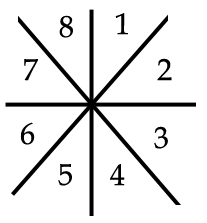 My 1994 version of "Orville" included a graphic card reveal that also used two continue
buttons to input a card, but in this case, the quantities were input by a different kind
of spatial subdivision, more properly called a "gesture". During the time between the
mouse-down and mouse-release events, the computer paid attention to the vector or direction
the mouse was moving. Each vector lies within one of 8 octants as in the diagram
to the right, allowing the click to input one of 8 neighbors.
My 1994 version of "Orville" included a graphic card reveal that also used two continue
buttons to input a card, but in this case, the quantities were input by a different kind
of spatial subdivision, more properly called a "gesture". During the time between the
mouse-down and mouse-release events, the computer paid attention to the vector or direction
the mouse was moving. Each vector lies within one of 8 octants as in the diagram
to the right, allowing the click to input one of 8 neighbors.
Again, two such clicks were required to input a card. The nice thing about this sytem is that
much smaller buttons can be used, and the mouse movement can be extremely subtle, moving only a
few pixels. When I was well rehearsed in this method, it appeared as if I wasn't moving the
mouse at all: The hand travels to the mouse, appears to click the button, and travel off of it,
with very little contact.
In the section on delimiting input, below, I will introduce a couple of refinements in
which one can input the entire card using a single mouse click.
2.2 methods of delimiting input
By being clever about *when* we pay attention to the mouse (not just on mouse clicks), we
can cram more information into what appears to be a single mouse click.
2.2.1 basic click
If we pay attention to only a single mouse click, it is still possible to input
a small number, such as 1-8 using normal spatial subdivision methods on a button.
However, if the computer puts a message on the screen saying "click anywhere to continue"
than one can position the mouse anywhere on the screen, and use a larger set of spatial
divisions.
2.2.2 two clicks
Using my normal system, each click multiplies the available choices by eight. I normally
use two clicks for a choice of 64 items (or 52 cards), as described above.
You could also conceively use a 10x10 arrangement, which would be good for "guess a number
from 1-100" style games.
But what about inputting such a large number with a single click? Read on...
2.2.3 move-click
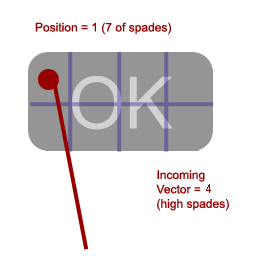 In this method, we pay attention to the cardinal direction of the mouse movement (as in 'Gestures' above)
just before the button goes down. This gives us our first number. We pay attention to where
the mouse pointer is (as in spatial subdivision, above) for our second number. So, for example,
to input the 7 of spades, we would enter the button from octant 4 and click on
it's upper left-hand corner.
In this method, we pay attention to the cardinal direction of the mouse movement (as in 'Gestures' above)
just before the button goes down. This gives us our first number. We pay attention to where
the mouse pointer is (as in spatial subdivision, above) for our second number. So, for example,
to input the 7 of spades, we would enter the button from octant 4 and click on
it's upper left-hand corner.
Alternately this method can be used to create a 1-click "object recognition system" which
recognizes objects. The user is given a prompt to "hold the object up to the screen".
The magician clicks the "GO" button and the computer says "I see a watch with leather band."
I experimented with this technique in the mid-90s, but mostly stuck to the 2-click variety,
finding it a little easier to perform without error.
2.2.4 click-release (or click-move)
This is the compliment of the above method and is equally effective.
We get our first number from the position of the mouse at the time the button goes down,
and our second number from the direction of movement between when the button goes down and
when the button goes up.
This is the method I used in my 2007 effect, "The One-Click Card Trick".
Alternately, we can pay attention to the direction of movement in the second following the
button release (click-move).
2.2.5 move-click-release
1000 choices from a single click?
By combining various elements from the above, we could add even more information into a single
mouse click, inputing 3 numbers (0-9), for a total of 10 x 10 x 10 = 1000 choices.
For example, the first number comes from the movement leading to mouse-click, the second
number from the mouse position at mouse-down, and the third number from the motion between
mouse-down and mouse-up.
In practice I have never used such a system, because I haven't devoted the time to rehearse it,
but in theory this could be quite powerful, enabling the computer to select such things as
numbers from 1-1000, or the year of historical events.
If a mentalist has already invested the time to develop a mnemonic system to memorize
the ordinal numbers of 1000 different objects, this method could be used for extremely
precise object recognition.
2.2.6 timed input
As in timed keyboard input, one can delimit mouse input by timing. In my effect
"The Oracle of Batboy" (2003), I combine a spatial subdivision with timing
to input two numbers without pressing the mouse. During the effect, there is an animation
that cycles the face of the Batboy character, and the Magician times the mouse movement
to correspond to the eye blinks which appear in a single, double, single, double pattern.
The first number is based on the mouse position during the single eyeblink, and the second
number is based on the mouse position during the double eyeblink. Subsequently, the magician
presses a button to activate the card reveal.
3. other methods (network confederate, camera)
There are certainly many other ways of inputting information to a computer. One
could have a confederate who is networked to the computer in some fashion, or one
can use a digital camera or webcam.
In practice I have used neither of these methods, because I find the keyboard and mouse
methods sufficient. Also, I find that spectators are quick to suspect that a confederate
or camera is involved - this is a very common "first theory" for how my tricks work.